
Time Tracking with Meal and Rest Break Records for Tree Care
Protect your crews and business, and run a disciplined, professional operation with ArborNote's powerful time tracking feature, with built-in meal and rest break tracking. Gain visibility, control, and stronger documentation across your field operations.
Clear records of the entire workday


Clock-in / Clock-out
It’s one tap to clock-in at the yard to start the day, and one tap to clock out when the workday is complete. GPS coordinates are recorded each time. Time tracking gives managers real-time visibility into who’s working, on what, and for how long.


Track time on individual work orders
There are two levels for time tracking 1) Work day level 2) Work order level. Record the actual time it takes crews to complete individual work orders. Compare this versus the estimated delivery scope, benchmarks different crews to improve crew and business performance.
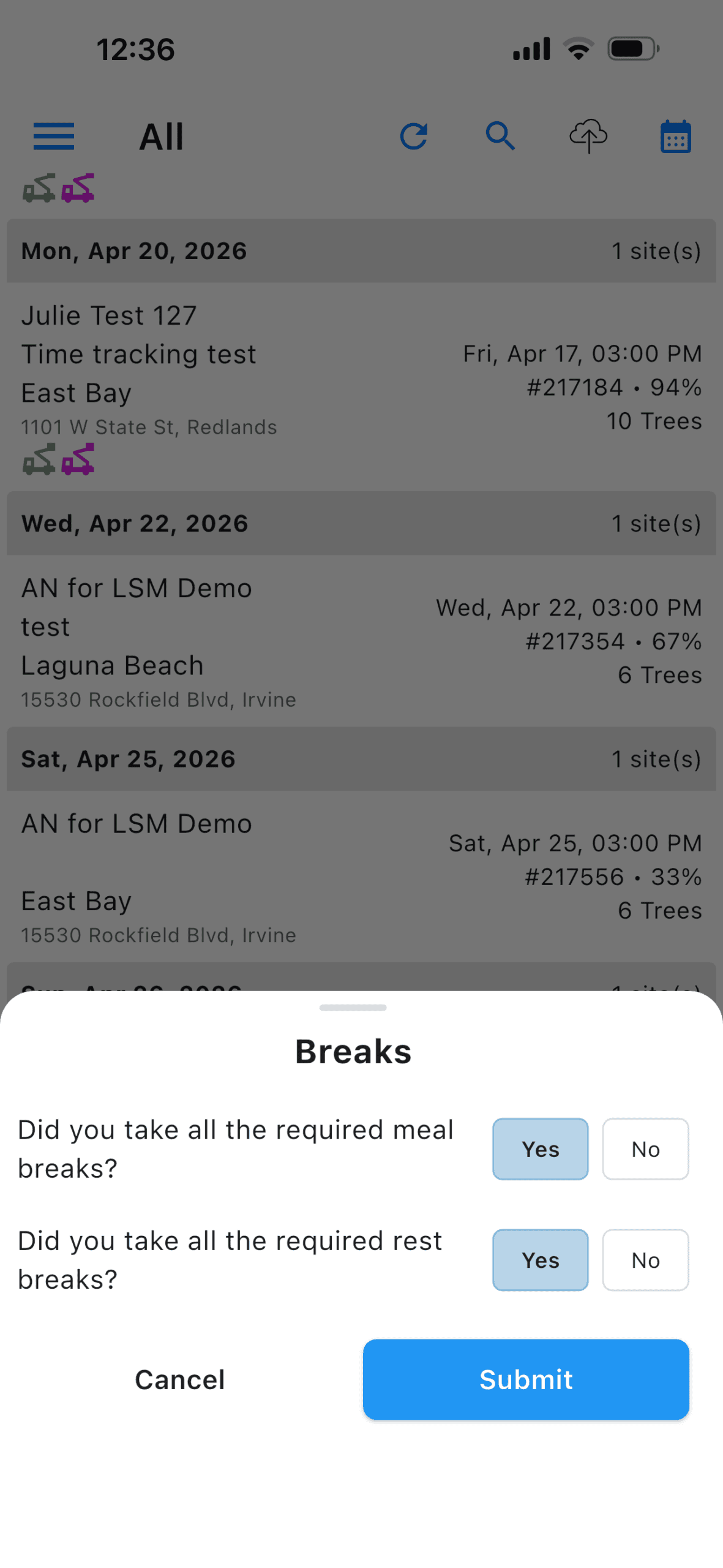
Record breaks and lunches
Break tracking and daily records help ensure your crews are working safely and optimally. It also creates a defensible record that your crews were provided the opportunity to take appropriate breaks.
Know exactly where every hour goes
When crews move between job sites and schedules change, accurate time records become critical: for payroll, for accountability, to support your internal policies and compliance efforts.
Break tracking and daily records help create a defensible record that your crews were provided the opportunity to take appropriate breaks.
These improvements are built with your field teams in mind.
Safety, operational efficiency, and simplicity remain at the forefront — giving you stronger oversight without adding friction for your crews.
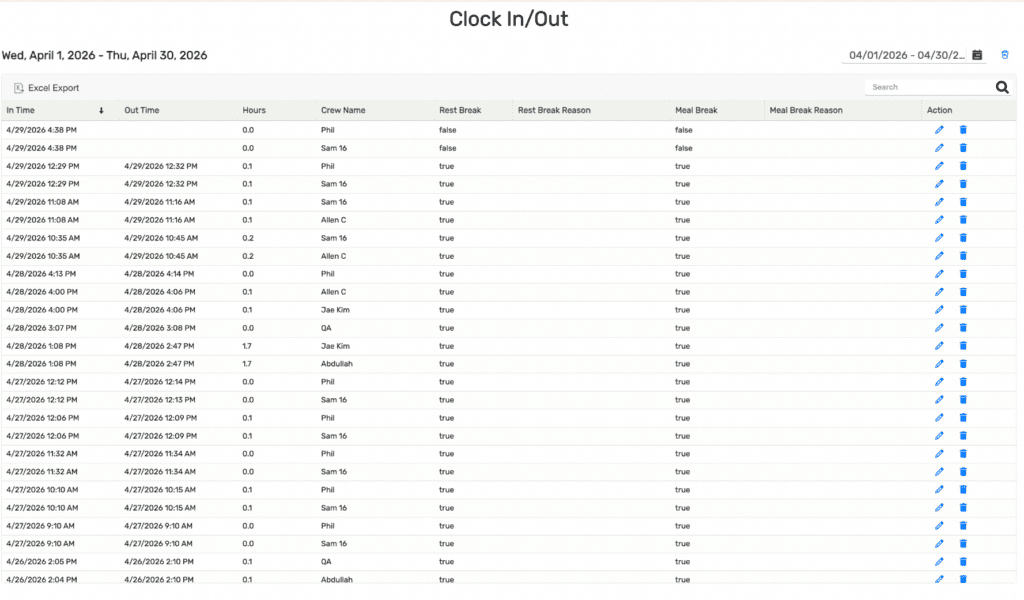
Everything managers needs to stay in control and compliant
Real-time crew tracking
See who’s clocked in, on which work order, in real time.
Edit without reopening
Managers can correct clock-in times, out times, and break status on the desktop product, even after a work order is closed. No workflow disruption needed.
Per-crew time breakdown
The Work Order tab shows exactly how much time each crew member spent per job, perfect for billing clients and reviewing field performance.
Clock summary reports
Aggregate hours by crew member across any date range. Filter by week, run the payroll report, and export to Excel in one click.
Archived records
Deleted time entries are fully archived. Managers can review removed records for auditing and compliance purposes.
Custom break reasons
Define your own meal and rest break reasons in Time Tracking Settings. Add, edit, or remove reasons to match your company’s policies.
Command your crews from the office
Clocking-in and out takes place in the ArborNote Works mobile app. Time Tracking in the desktop product is built for managers. Three dedicated tabs give you the right view for every question, whether you’re adjusting a single time entry or running the weekly payroll report.
TIME TRACKING - FREQUENTLY ASKED QUESTIONS
Where is Time Tracking recorded?
Time tracking is recorded by crew leaders in the ArborNote Works app. ArborNote Works is the crew app for teams in the field to complete work orders safely and professionally. All the work order info syncs in real-time to ArborNote’s Desktop product.
ArborNote Works is a paid add-on to ArborNote for crews to complete work orders, and it’s completely separate from any pricing or proposal information. See the latest pricing for ArborNote and ArborNote Works.
What are the different levels to clock-in?
The main clock-in records that a crew member is present on site for the day. The work order clock-in tracks time spent on a specific job. Crews and crew members need to be clocked in for the day before a crew member can clock into any work order.
Do crew members need their own app access to be clocked in?
No. Crew leaders can clock in any crew member directly from the ArborNote Works app. Individual crew members do not need their own login or device access, which simplifies the process in the field.
Can a crew member be clocked into more than one work order at the same time?
Yes. A single crew member can be clocked into multiple work orders simultaneously. This is useful when crews split across jobs mid-day, and each work order tracks their time independently.
What happens if I have multiple admins logged in at the same time?
If multiple crews from the same account are clocked in, each admin can see all currently clocked-in users when they log into the Works app. This visibility helps prevent duplicate clock-ins or scheduling conflicts across crews.
Can I edit a clock-in record after a work order has been closed?
Yes. From ArborNote desktop, admins can edit clock-in times, clock-out times, break status, and break reasons regardless of whether the associated work order is open or closed. No reopening of the work order is required.
What is the break questionnaire and when does it appear?
When completing a Main Clock-Out at the end of the day, a questionnaire pops up asking about breaks taken. Crew leaders can select from preset reasons or enter a custom reason. Break reasons are fully customizable in Time Tracking Settings in ArborNote Desktop.
How do I export time data for payroll?
From the ‘Clock Summary’ tab on ArborNote Desktop, select your desired date range and click “Excel Export.” This downloads the current filtered table as an Excel file, ready for payroll processing. The default view covers Monday to Sunday of the previous week.